
Got the code? Welcome, builder!
You're heading into A Byte of Python & Turtle — instructors hand out the access code on day one.
You're heading into A Byte of Python & Turtle — instructors hand out the access code on day one.
turtle is a drawing module that ships with Python, so there's nothing to install. It gives you a cursor (the "turtle") that draws a line wherever it goes. Every shape you'll make today comes down to the same little dance: move forward, turn, repeat.
Open 1-shapes.py. The setup is already written:
import turtle

screen = turtle.Screen()
screen.setup(800, 800)        # an 800 × 800 pixel canvas

t = turtle.Turtle()           # the cursor, at (0, 0), facing right

# ... your code goes in the TODO section ...

turtle.done()                 # keeps the window open when drawing ends
The canvas coordinate system takes a moment to get used to: (0, 0) is the centre. x increases to the right, y increases upward, so the canvas runs from −400 to +400 in both directions.
The grey # lines are comments. Python skips them entirely; they're notes for whichever human reads the file next. The # TODO lines show you where your code goes.
| Command | What it does |
|---|---|
t.forward(100) |
Move 100 pixels in the current direction, drawing a line |
t.backward(100) |
Move backwards (no turn) |
t.left(90) / t.right(90) |
Turn by 90 degrees |
t.penup() / t.pendown() |
Lift / lower the pen — move without/with drawing |
t.goto(x, y) |
Jump straight to a coordinate |
t.color("turquoise") |
Change the pen colour (named colours for now) |
t.forward(100)
t.left(90)
t.forward(100)
t.left(90)
t.forward(100)
t.left(90)
t.forward(100)
t.left(90)
If your "square" comes out as a single line, don't re-read the code top to bottom. Trace the turtle's path with your finger instead, starting from the first line. You'll find the missing left(90) yourself, I promise.
Here's the bit I find genuinely lovely. Every regular polygon, no matter how many sides, is the same two moves: forward, then left(360 / sides), repeated sides times. A triangle turns 360 ÷ 3 = 120° at each corner:
t.penup()
t.goto(150, 0)        # move away so the shapes don't overlap
t.pendown()
t.color("coral")
t.forward(80)
t.left(120)
t.forward(80)
t.left(120)
t.forward(80)
t.left(120)
The penup() → goto() → pendown() sandwich is how you place shapes anywhere on the canvas. Forget the penup() and a stray line drags across the canvas to the new position. If you spot one, ask yourself: was the pen up when I called goto()?
| Symptom | Fix |
|---|---|
| Window opens, instantly closes | Add turtle.done() at the bottom |
| Turtle draws partway then disappears off-screen | forward(1000) on an 800px canvas does that — smaller numbers, or t.home() to recentre |
AttributeError: ... has no attribute 'forward' |
You wrote Turtle.forward() with a capital T — call it on your turtle: t.forward() |
| The window hides behind VS Code (macOS) | Click the Python rocket icon in the dock |
Hexagon: six sides. What's the turn angle? (360 ÷ 6)
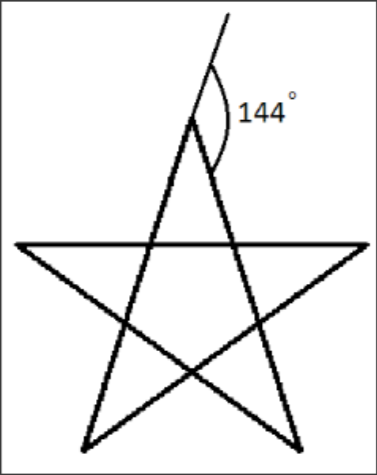
Star: draw a five-pointed star. Hint: the turn is 144°, not 72°. The star skips a corner each step and winds around the centre twice (5 × 144° = 720° = two full turns). Use 72° and you get a plain pentagon.
Initials, pen down: draw your two initials as block letters without ever lifting the pen. Sketch the path on paper first, because dead ends like the crossbar of an "A" need a backtrack.
Nested squares: a square, then a slightly smaller one rotated 20° inside it, and again, and again. What has to change between squares?